Sign your document online

Upload a PDF, Word or image, add a simple electronic signature (SES) and fill in the fields — right in your browser, without registration or installing software.

Pages

Page structure

      Latest signatures

      Text

      Font size:

      Font:

      Align:

      Modifiers:

      Color:

      Date and time

      Font size:

      Font:

      Align:

      Modifiers:

      Color:

      Type:

      Value type:

      Document

      Tap Open or Save to see the list

      Upload your document for signature

      We support PDF, PNG, JPG, DOCX formats

      We support uploading a single file in these formats:: PDF, PNG, JPG, DOCX formats. Please try again

      100% in your browser No registration Multi-page PDF

      How to sign a document online in 3 steps

      No installation and no sign-up. Upload a file, add your signature and fields in the browser, and download the ready document — for free.

      1. 1
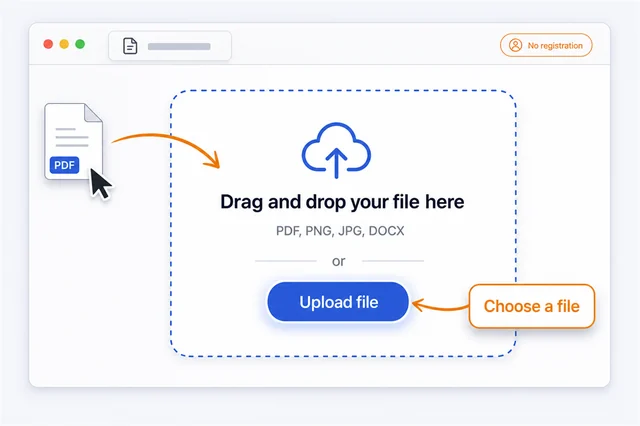
        Step 1: upload a document to the online editor — drag and drop a file or choose a PDF, Word, JPG or PNG

        Upload your document

        Drag a file into the upload box or pick it from your device. PDF, Word and JPG/PNG images are supported. The document opens in the editor within seconds.

      2. 2
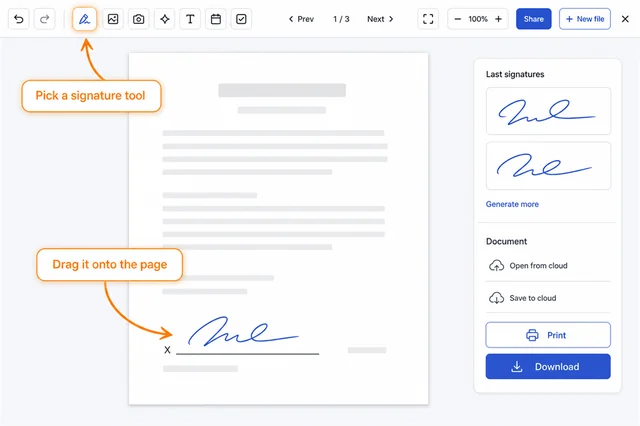
        Step 2: add a signature in the editor — select the signature tool and place it on the document page

        Add your signature and fill fields

        Add a signature and, where needed, text, a date, checkboxes and initials. You can sign any page of a multi-page document.

      3. 3
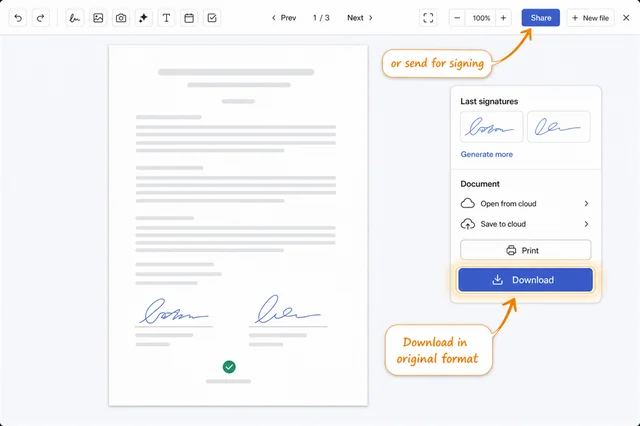
        Step 3: download the signed document in its original format or send it for signing

        Download or send for signing

        Click Done and download the document in its original format. Or send it to another person to sign by link or email.

      Four ways to add your signature

      Sign the way that suits you. Unlike most services, we have a built-in handwritten signature generator — create a beautiful signature in a second, even if drawing with a mouse is awkward.

      Our advantage

      Generate a handwritten signature

      Type your name and our generator creates a neat handwritten signature in different calligraphic styles. Regular signing services don’t have this — you don’t need a ready sample, a beautiful signature is created automatically.

      Draw your signature

      Sign with your mouse or with your finger on a phone — just like on paper.

      Scan your signature with the camera

      Sign on paper, point your camera at it, and the signature is recognized and cleaned up automatically. Scan only your own signature. Available after signing in.

      Upload your signature

      Have a photo or scan of your signature? Upload the image and place it in the document.

      Electronic signature for documents online

      A free electronic signature (e-signature) for any document: sign a PDF, Word file or image right in your browser — no software, no sign-up. Add your signature, date, initials and text fields and save the finished file.

      Sign a PDF online

      Upload a PDF and add your electronic signature in a minute — nothing to print or scan.

      Electronic signature (e-signature)

      A simple e-signature suitable for contracts, invoices, applications and acts. Works on phone and computer.

      Date, initials and signers

      Add a date, initials and several signers, then send the document for signature by link.

      Everything for working with documents

      Upload PDF, DOCX, PNG, JPG

      Support for popular document and image formats.

      Fields: signature, date, text, checkbox

      Add fields and place them exactly where you need.

      Multi-page documents

      Comfortable work with documents of any length.

      Signature: generate, draw, scan, My signatures

      Create signatures any way you like.

      Cloud: Google Drive, Dropbox, OneDrive (soon)

      Import and save documents in cloud services.

      Send for signature and get it back

      Send a document for signature and get the finished result.

      Email and bulk sending

      Send documents to one or many recipients at once.

      Link protection: password, one-time, limit, code

      Set link security and access control.

      QR verification, audit, SES certificate

      Verify authenticity, view the audit and download the certificate.

      Sign PDF, Word and images

      Upload a document in a convenient format — the signature goes right into it, and the file downloads in its original form.

      Sign PDF online

      The most common format for contracts and invoices.

      Sign Word online

      .doc and .docx documents.

      Sign an image

      Scans and photos in JPG and PNG.

      What it's great for

      Contracts and acts

      Sign contracts, acts and addendums.

      Applications and forms

      Fill out and sign applications and forms.

      Invoices and offers

      Issue and sign invoices and commercial offers.

      HR and personnel

      HR documents, orders and consents.

      Why signing online is more convenient

      An electronic signature saves time and lets you handle business from anywhere — no printer, scanner or in-person meeting.

      Your documents are protected

      We built the service around privacy: your files and signature stay with you.

      Processing in the browser — the signature is applied on your device; the document isn’t uploaded to third-party servers.

      Encrypted connection — all transfers are protected with SSL.

      We keep nothing extra — we don’t collect your documents or share signature biometrics with third parties.

      You control the file — you download the result yourself, so your data stays under your control.

      More in PRO

      Advanced features for teams and professionals.

      Export to all clouds Bulk sending SES certificate Document audit Link protection
      View plans

      Frequently asked questions

      How do I sign a document online?

      Upload a PDF, DOCX, PNG or JPG, add a signature field (generate, draw or scan it with your camera), add a date, text and checkboxes if needed, then download the finished document or send it for signature by link.

      Which file formats can I upload?

      The editor supports PDF, DOCX, PNG and JPG, including multi-page documents. The finished file is downloaded in the same format you uploaded.

      Is it free and do I need to register?

      You can upload and sign a document for free and without registration. Advanced features (bulk sending, export to all clouds, SES certificate, audit, link protection) are available on the PRO plan.

      Is it safe? Where do my files go?

      The document is processed right in your browser — the file is not uploaded to the server without your action. When you send a document for signature or by link, you control access: password, one-time link, view limit and email code.

      Can I send a document to another person for signature?

      Yes. Send the document by link or email — the recipient signs it on their side, and you get the finished file back and see its status.

      Does the electronic signature have legal force?

      We create a simple electronic signature (SES) and a certificate for the signed document, and every action is recorded in the audit trail — confirming the fact and time of signing.

      Can I open a document from the cloud and save it back?

      Yes, you can open a document from Google Drive and Dropbox (OneDrive coming soon) and save the signed file back to the cloud or send it to your email.

      Does it work on a phone?

      Yes, the editor is fully adapted for smartphones and tablets — you can sign a document with your finger right from your phone.

      How do I make a nice signature?

      Use the built-in handwritten signature generator: type your name and choose one of the calligraphic styles — a beautiful signature is created automatically, no sample needed. You can also draw it by hand or upload an image.

      What’s the difference between a simple and an advanced signature?

      We create a simple electronic signature (SES), which fits most everyday documents. For special cases (real-estate deals, notarial and some government documents) the law may require an advanced or qualified signature — check the requirements in your country.

      User reviews

      4.79 Based on 945 reviews

      I liked everything about this tool this is nice and i hope everyone finds it it helped me a lot

      E
      EpicFailure342 May 29, 2026

      Çok memnunum arada kullanıyorum. Bazen gönderilen belgelerde imza olmuyor burdan kişi ismine göre hazılayabiliyorum.

      E
      Erken April 20, 2026

      So far the best i have seen. This is good innovation team and keep going.

      D
      Denis October 2, 2025

      It works perfectly well like magic. i recommed this all people. join us and thank me later

      C
      collins.otoo@outlook August 2, 2025

      Wow this is my new signature now thank you so much

      J
      Joey August 1, 2025

      Your hard work and dedication are truly inspiring! The effort you put into everything you do shines through brilliantly. You have a remarkable ability to uplift others with your positivity and kindnes

      E
      ermia May 30, 2025

      Weri go You are great, you have very good signatures.

      S
      Spehr February 21, 2025

      Very useful program, I was always looking for something like this

      O
      Omid January 3, 2025

      این خیلی خوب است و من به بقیه این سایت را معرفی میکنم

      D
      DNemat January 1, 2025

      Sign your document for free

      Upload a file and add your signature right in the browser — no registration, in a couple of minutes.

      Sign a document